
Training Template Recommendation for Supervisors and Managers
-
Review the training syllabus presented to employees, so supervisors have clarity regarding the message to personnel
-
Introduce Skills Base and the benefits that will be realized from its implementation.
-
Supervisor Assessments
-
the benefits of feedback from both the employee and the supervisor for a more objectives view of their personnel skills.
-
creates a dialogue between the employees and their supervisors to realize uniform understanding of people's abilities
-
it allows management to understand the training needs of the organization.
-
-
-
Introduce the rating scale
-
Introduce the methods for Supervisors to perform assessments of personnel.
-
Introduce any reports that supervisors will be authorized to leverage for analytics.
-
Introduce People Finder for managers who need to identify resources with specific skills and abilities
The following is a sample training guide you can use to provide to trainees to assist with their training:
Skills Base Supervisor Training Guide
Welcome to the Skills Base Supervisor Training Guide! In this guide, we will walk you through the process of completing a supervisor assessment on the Skills Base platform. Assessments are an essential part of evaluating and measuring skills proficiency. This is very important for the organization as it can help to identify areas in which team members need additional training, areas in which team members are especially well skilled, and allow alignment of work with interest and skill areas. You supervisor skills assessment will be used to ensure alignment of tasks and company goals and objectives with the right personnel.
Because of this it’s important that you are as accurate as possible when completing your assessment of an employee you oversee.
Now, let’s get started! It’s easy.
Step 1. Accessing the supervisor assessment.
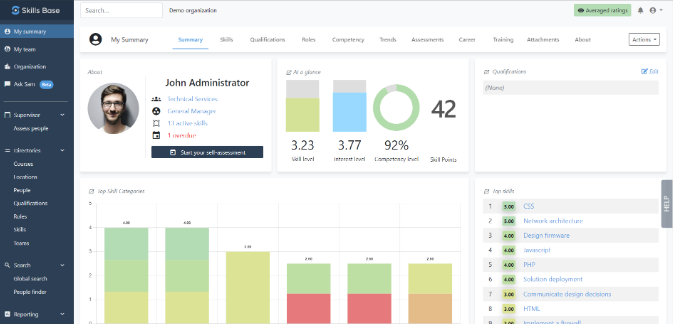
You should have created your login credentials and accessed your Skills Base instance. Once you log on, you will see the links you have access to. On the left in the navigation pane will be a link to “Assess People”. This link will allow you to see the individuals who you have responsibility for and who are due a supervisor assessment,
Step 2. Selecting the personnel to begin a supervisor assessment
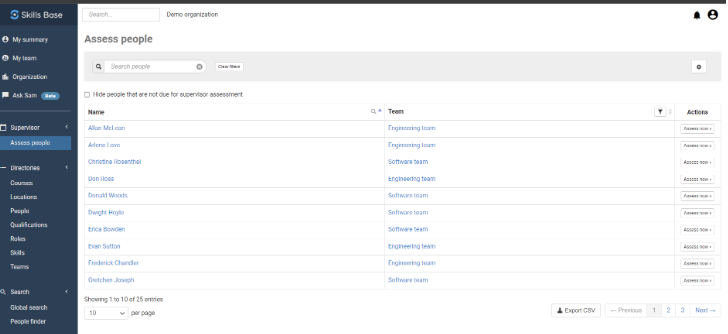
Once you have clicked on the Assess People link you will be presented with the list of people for whom you have responsibility to assess. On the right side of the screen will be an action button titled “Assess now”. When you click on that button you will begin the assessment of that person for the skills assigned to them.
Step 3. Beginning your supervisor assessment of the selected individual
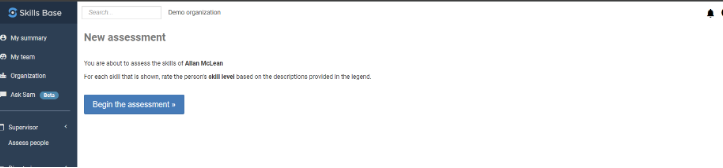
When you select one of the individuals you will be presented with the screen that allow you to begin the supervisor assessment. You will click on the “Begin the assessment” button which will start the supervisor assessment.
Step 4. Rating the individual’s skills
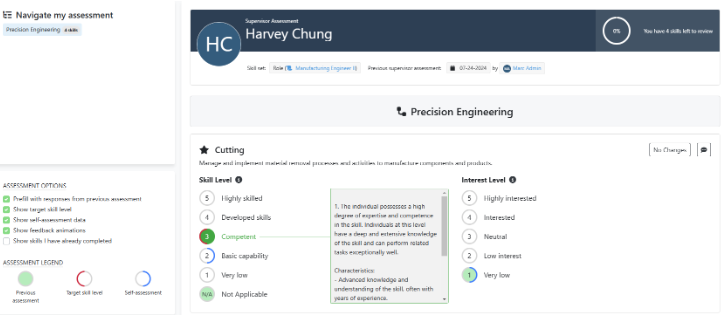
Skills Base provides a rating scheme with instructions on what each level means in terms of ability when a rating value is moused over. Make sure to be as accurate as possible as you complete the assessment and use the details of the rating scheme to help you.
The skills that are assigned to the person will be presented. If you enable the ‘Show self-assessment data' by clicking on the box, you will be able to see the rating the employee gave themselves for each skill. That is noted with the blue circle around the rating
As you rate each skill the next skill will be presented. You can also record comments as you proceed by clicking on the comment icon
As you progress through your overall progress is shown at the top of the page on the right (as shown below).
Step 5. What next?
When you have completed all of the assessment ratings you can add some final comments at the very end. When you click on the “Submit” button the assessment is completed.
You can now use the dashboard to review skill insights and to also access training (if your organization has offered this). The person’s dashboard will appear similar to the one below and includes sections on the person’s Qualifications, Competency level relative to targets for their role (if setup), Trends, and more.
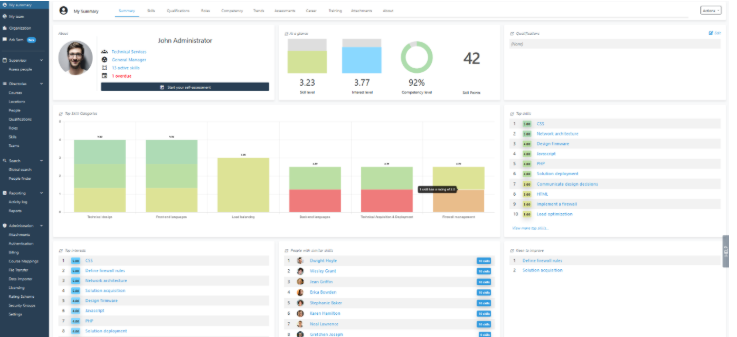
The employee can use the skill insights in the dashboard to access career insights (if your organization has offered this).
Thank you for completing the assessment! This information is critical in helping to align work with skills and interests, provide focused and targeted training that will add value and help you with your career planning.