
Skills Base includes a REST API which is available to paid license holders and provides a way for organizations to programmatically access their data in Skills Base. The API uses JSON formatted data for communications.
API Endpoints
Enabling the API
You can enable the Skills Base REST API for your instance via the following steps:
-
Navigate to [Administration > Settings > API > Manage API Keys]
-
Click the "+Add client ID" button

An API key and Secret will be generated which are used to obtain an access token (refer to "Authentication" below).
You can disable the API by clicking the "Delete keys" button. Note that this will delete the keys that have been generated and break any active integrations that you have. If you enable the API again different keys will be generated which means you will have to update the keys in your code before your integration(s) will start working again.
API Host
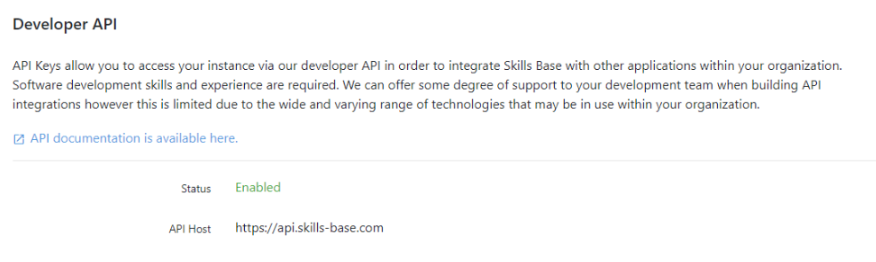
Your Skills Base instance is directly associated with a specific API host. If you use the wrong API host, you will not be able to authenticate.
To view your API host:
-
Navigate to [Administration > Settings > API > Manage API Keys]
-
Retrieve the API host from the "API Host" field. In the example below the API Host is https://api.skills-base.com
Use this host for all API calls.
Authentication
The Skills Base REST API implements the OAuth 2.0 standard, and specifically the Client Credentials grant type, for authentication of client requests.
Obtaining an access token
Access tokens are used to authenticate API requests. To obtain one, send an HTTP POST request to the endpoint listed below, with your API key (client_id), secret (client_secret) and grant type (grant_type, which must be "client_credentials") as form-encoded data in the request body. Alternatively, you can send the API key and secret in an HTTP Basic Authorization header, as described in the OAuth 2.0 standard. The grant_type parameter is always sent in the request body.
Access tokens expire (see "Access Token expiry" section below), and there is also a limit on the number of access tokens that can be active at any time (see "Access Token limit" section below). If you exceed the limit the API will refuse to issue any further tokens until an active one expires. Note that access tokens expire after a period of time that is specified in the JSON response (in seconds). To avoid hitting the token limit, it is important to keep using the same access token until it expires (see the recommended approach in the "Access Token expiry" section below).
Endpoint
/oauth/access_token
A sample access token request:
POST /oauth/access_token HTTP/1.1
Host: example-api.skills-base.com
Accept: */*
User-Agent: OAuth gem v0.4.4
Connection: close
Content-Type: application/x-www-form-urlencoded
Content-Length: 175

grant_type=client_credentials&client_id=xxxxxxxxxxxxx&client_secret=xxxxxxxxxxxxx
A sample response:
HTTP/1.1 200 OK
Date: Thu, 25 Feb 2016 05:54:06 GMT
Server: Apache
Expires: Thu, 19 Nov 1981 08:52:00 GMT
Content-Length: 99
Content-Type: application/json

{"access_token":"xxxxxxxxxxxx","token_type":"Bearer","expires_in":3600}
The parameters in the access token response are:
|
Parameter |
Description |
|
|
Your access token which will be used later to invoke API methods |
|
|
Will always be set to "Bearer" |
|
|
Indicates how long until the token expires (in seconds) |
Access Token expiry
All issued access tokens expire within a given timeframe that is indicated (in seconds) in the response provided when the token is issued. It is not necessary to track this time or attempt to calculate when an access token is due to expire, and attempting to do so will likely be inaccurate. Instead, we recommend to continue using an issued access token until the API responds with HTTP 400 status and the "message" parameter contains the string "Invalid or expired access token", indicating that the access token is no longer valid. Check the message as well as the status code, because the API also uses HTTP 400 for other errors, such as invalid request parameters. At that point it is possible to request a new access token via the same method detailed in the above section "Obtaining an access token".
Since the Skills Base API implements the OAuth 2.0 Client Credentials Grant standard for authentication, please note that "Refresh tokens" are not used, as that standard stipulates that "refresh token(s) SHOULD NOT be included" in responses, and they are also not useful or necessary in this circumstance.
As such, the following sequence is recommended for interacting with the Skills Base API:
-
Request an access token
-
Perform API requests
-
Repeat from step 2 until an "Invalid or expired access token" response (HTTP 400) is received
-
Once an "Invalid or expired access token" response is received, repeat from step 1
Using this recommended approach, only one active access token should ever be required per integration.
Making API calls
Once you have an access token, you can begin making API calls. There are some requirements for API calls:
-
A valid Access Token must be passed as a HTTP
Authorization: Bearerheader. -
You must use the HTTPS protocol for all API requests.
-
Requests that include a body must specify a supported content type in the
Content-Typeheader (see the table below). API 2.0 responds with HTTP 415 status to aPOSTorPUTrequest that is not JSON-encoded.
Supported request body content types
|
Content type |
Use header |
Support |
|
Form-encoded data |
|
API 1.0 only |
|
JSON-encoded data |
|
API 1.0 and API 2.0 |
Example API call
POST /1.0/people/search HTTP/1.1
Host: example-api.skills-base.com
Content-Type: application/json
Authorization: Bearer xxxxxxxxxxxxxxxxx
Content-Length: 28

{
    "first_name": "T*"
}
API Responses
The following fields are included in API responses:
|
Name |
Data type |
Description |
|
|
string |
Will contain the string "success" when the operation was successful or "error" when the operation could not be performed. |
|
|
string |
This parameter will appear only when there is a message returned by the API (usually in association with an "error" status. The message will provide additional information about the API call that was made. |
|
|
object|array|null |
Contains any data that is returned by the API. Note that data is limited to 500 records (see "Data limit" below). |
Sample API response:
HTTP/1.1 200 OK
Date: Thu, 25 Feb 2016 05:54:06 GMT
Server: Apache
Expires: Thu, 19 Nov 1981 08:52:00 GMT
Content-Length: 369
Content-Type: application/json

{"status":"success","data":[{"id":1,"first_name":"Test","surname":"User","email":"test@example.com","full_name":"Test User","team_id":null,"role_id":null,"location_id":null,"security_group_id":1,"skillset":"all","last_self_assessment":"2014-03-29","last_supervisor_assessment":null,"source":"local","login_enabled":true,"last_login":"2015-05-21","locked":true}]}
Data types
Following is a summary of the data types used and supported by the Skills Base API
|
Type |
Accepted values |
|
integer |
Any whole number |
|
decimal |
A number with 2 decimal places |
|
float |
A number with greater than 2 decimal places |
|
string |
Any string |
|
date |
A date in the format |
|
boolean |
true or false |
API limits
Rate limit
The Skills Base API is limited to a certain number of requests per time interval. You can check your rate limit via the "API Keys" page in your Skills Base instance (log in as an Administrator and click [Admin > Settings > API > Manage API keys]). If you exceed the limit, the API will respond with HTTP 403 (Forbidden) status for API 1.0, or HTTP 429 (Too Many Requests) status for API 2.0, and the "message" parameter will contain the string "API rate limit exceeded. Try again in x minute(s)".
The rate limit applies to each API key separately, and counts every request made with access tokens issued for that key. The interval begins with the first request after the previous interval has ended. Requests for access tokens do not count towards the rate limit.
Don't exceed the rate limit for a prolonged period of time as it can be interpreted as a Denial of Service attack which may result in your IP address being blocked. Pay particular attention to parts of your script that retry failed requests (eg: invalid access token, API rate limit exceeded, etc). If there is no delay between retries you may find your script flooding the API with requests in excess of the rate limit.
You can check the rate limit status via the following two HTTP headers that are returned in the response from API endpoints:
-
X-RateLimit-Remaining- The number of requests that you have remaining in the current interval -
X-RateLimit-Reset- Indicates the time that the current interval ends and the counter will be reset (as a Unix timestamp)
Data limit and result pagination
When you call an API to retrieve a list of records, by default it will only return the first 500 items. You can override this by including a limit parameter. You can access further pages of records by making a subsequent API call using the start_index parameter.
limit parameter
This parameter can be appended to the URL query string, and is used to specify an alternative maximum number of records to fetch. The value may range between 1 and 2000. If omitted, the default value of 500 applies. A value outside that range results in an HTTP 400 response.
GET /1.0/people?limit=1000
start_index parameter
This parameter can be appended to the URL query string, and is used to specify the starting index when fetching records. Records in the Skills Base API are zero-indexed, so to fetch the 501st record to the 600th for example:
GET /1.0/people?start_index=500&limit=100
Access Token limit
The API limits the number of access tokens that are active at any one time for each API key. You can view your access token limit in [Administration > Settings > API > Manage API Keys > Token limit]. Once the allocated number of access tokens have been issued no further tokens will be issued until at least one of the issued tokens expire. If you attempt to generate a new access token when you have already reached the maximum number of active tokens the API will respond with HTTP 429 status and a message stating "Access token allowance exceeded". In this case you must use one of the existing issued tokens or wait for at least one of those issued tokens to expire before a new one can be generated.
Search APIs
Search APIs provide additional feature to help you search for records.
Wildcards
For fields that support wildcards, you can use the Asterix character to search for partial strings. For example, to search for people beginning with the letter "s":
"s*"
Greater Than and Less Than operators for date fields
The Search API offers additional functionality for fields with the "date" data type. The greater than (>) and less than (<) logical operators can be included at the beginning of the date to specify a date range. For example, to search for records before the 1st of January 2016:
"<2016-01-01"
To search for records in 2015:
[">2014-12-31", "<2016-01-01"]
Case insensitivity
The search APIs are case insensitive
API changes
Any changes we make to APIs will ensure backwards compatibility. If we need to make significant changes to an API that would break existing integrations we will release a new API and maintain both until such time that the old one can be phased out without impacting customers.
Please note that we may add features to APIs and so you should not rely, for example, on an object having a set number of properties. Always ensure your integrations will not be affected by the addition of properties to objects used by the API.